Uit Bitbybit Information Systems
Nieuwe pagina aangemaakt met 'Category:Expand selection [[{{NAMESPACE}}:WebView Manual|Top]]<br> [[{{NAMESPACE}}:WebView expand resource selection|Expand selection]]<br> {{NAMESPACE}}:WebV...' |
|||
| Regel 58: | Regel 58: | ||
:<p></p> | :<p></p> | ||
:See also: [[8.3nl_Admin:Webber Activiteit toevoegen|Create Provider]]. This button is only visible if you have administrator authorisation. | :See also: [[8.3nl_Admin:Webber Activiteit toevoegen|Create Provider]]. This button is only visible if you have administrator authorisation. | ||
:{{Lightbulb}} Only providers in the 'Resource group' list of the corresponding 'User group' are visible in 'Expand provider selection'. | |||
:So before attempting to create a new provider first check whether it exists in the 'Provider resources'. | |||
It is also possible that the Tick the box at the top left (next to Provider) in order to tick all the providers of the provider type. | |||
[[{{NAMESPACE}}:WebView expand consumer selection|Next]] | [[{{NAMESPACE}}:WebView expand consumer selection|Next]] | ||
Versie van 7 apr 2022 10:55
Expand Provider selection
Steps
- Click the 'Expand selection' tab.
- Click the 'Provider' subtab.

- A list of provider types appears.
- An example of a provider type is 'A Wing'.
- Click a provider type to see its corresponding providers appear on the right.

- In the figure the provider type 'A Wing' was selected and its corresponding providers LBR and MNZ appear on the right.
- You can also select several provider types at once.
- In the figure the provider types 'C Wing' and 'A Wing' have been selected.

- Tick the boxes of the providers you wish to add to the selection.
- In de figure the providers LBR and MNZ are ticked.

 Tip: Tick the box at the top left (next to Provider) in order to tick all the providers of the provider type.
- Click the 'Save to basket' button.

- The system springs to the 'My selection' tab, 'Provider' subtab and the selected providers have been added.
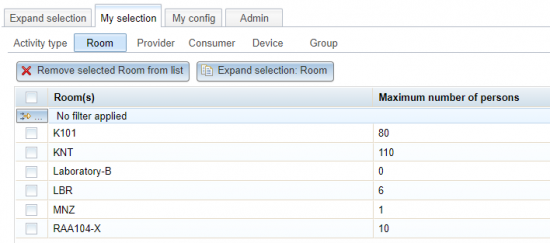
- See also: Provider selection.


Search
- If the list of provider types is very long use the Search button to find providers.
- Enter the text of you are looking for in the Search field.
- Click the Search button
- The providers appear on the right (if found).

- In the figure the search string is 'Lab' and providers containing this string appear in the table titled 'search results: Lab', on the right.

- Tip: If you click the Search button with an empty search field then you will get all providers (of all provider types)
Create a Provider
- Should you miss a provider you can click the 'Create Provider' button.

- See also: Create Provider. This button is only visible if you have administrator authorisation.
- Tip: Only providers in the 'Resource group' list of the corresponding 'User group' are visible in 'Expand provider selection'.
- So before attempting to create a new provider first check whether it exists in the 'Provider resources'.

It is also possible that the Tick the box at the top left (next to Provider) in order to tick all the providers of the provider type. Next
